在 Agent 中使用 MCPTask (Using MCPTask with Agents)
MCPTask 節點讓您能向 AI Agent 授予對外部工具與資料庫的臨時調用存取權。這項強大的機制讓您能精準掌控 Agent 何時以及如何與外部系統互動。
核心設計理念:具備記憶的臨時存取權
當您將 Agent 連線至 MCPTask 節點時:
- ✅ Agent 獲配存取權限:臨時取得調用指定 MCP 伺服器工具的能力
- ✅ Agent 能執行未知任務:完成原本受限於封閉環境而無法執行的操作
- ✅ Agent 完整保留記憶:深度記住執行過程中所獲取的新知識與數據
- ❌ 任務結束即回收權限:跳出 MCPTask 後,Agent 立即喪失對該 MCP 工具的直接連線
這實現了嚴謹的最小權限原則:創作者精確掌控外部工具的調用邊界,同時 Agent 能將成果知識帶往下游節點。
MCPTask 與 Agent 的架構互動流程
graph LR
    A[Agent 代理] --> B[MCPTask 節點]

    subgraph MCP ["MCP 外部系統"]
        B --> C[MCP Server 伺服器]
        C --> D[外部系統/工具]
        D --> E[運算結果/數據]
        E --> C
        C --> B
    end

    B --> F[保有記憶的 Agent]
    F --> G[下游 Agent 任務]
MCPTask 節點扮演暫時性擴充 Agent 能力的轉接橋樑,任務執行完畢後輸出承載了全新知識、但已剝離外部工具權限的乾淨 Agent。
逐步實戰演示:臨時存取與記憶保留
讓我們建構一個工作流程,直觀展示 Agent 如何臨時獲配 MCP 能力並在權限收回後持續維持記憶。我們將使用 Fetch MCP 伺服器示範 Agent 連網擷取資訊、隨後在無網狀態下繼續運用該知識。
事前準備
- 已依據快速入門教學完成 Fetch MCP 伺服器的建立
- 具備 Griptape Nodes 基本節點連線概念
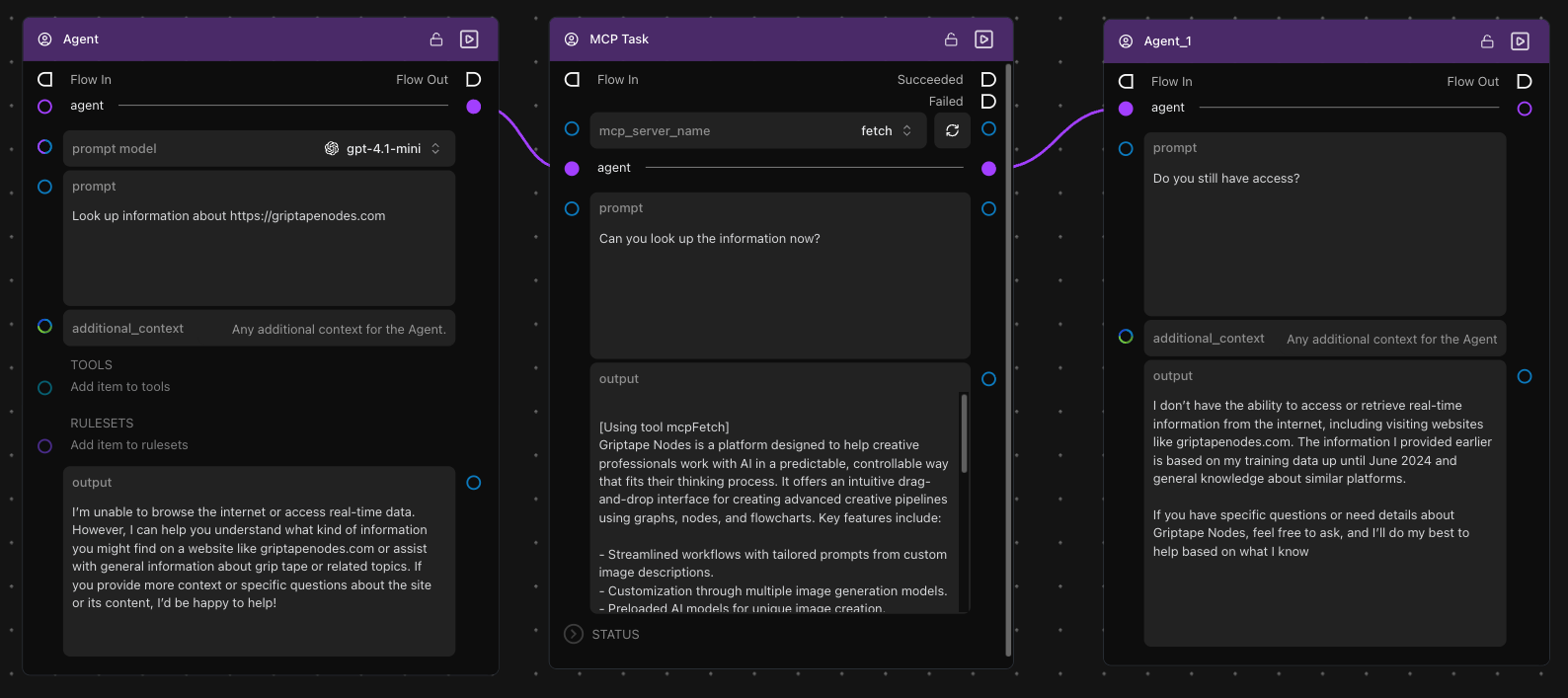
步驟 1:建立首個基準 Agent
- 拖曳一個 Agent 節點至畫布上
- 配置 Agent 參數:
- 將 prompt model 設為
gpt-4o-mini(或您慣用的模型) - 將 prompt 輸入為:
"Look up information about https://griptapenodes.com" - additional_context 暫時留空
- 將 prompt model 設為
-
點擊執行 Agent — 觀察其回覆,它會明確表示無法連線至網際網路:
I'm unable to browse the internet or access real-time data. However, I can help you understand what kind of information you might find on a website like griptapenodes.com...
這清楚展示了在未獲配 MCP 工具前 Agent 的能力邊界。
步驟 2:接入 MCPTask 節點
- 拖曳一個 MCPTask 節點至畫布上
- 將前述 Agent 的輸出埠連線至 MCPTask 節點的 agent 輸入埠
- 配置 MCPTask 參數:
- 將 mcp_server_name 下拉選單指定為
fetch - 將 prompt 輸入為:
"Can you look up the information now?"
- 將 mcp_server_name 下拉選單指定為
-
點擊執行 MCPTask — Agent 此刻獲配了 Fetch 工具權限,成功聯網抓取到了資訊:
[Using tool mcpFetch] Griptape Nodes is a platform designed to help creative professionals work with AI in a predictable, controllable way that fits their thinking process. It offers an intuitive drag-and-drop interface for creating advanced creative pipelines using graphs, nodes, and flowcharts...
步驟 3:接續下游普通 Agent 節點
- 拖曳另一個 Agent 節點至畫布下游
- 將 MCPTask 的 agent 輸出埠連線至該新 Agent 節點的 agent 輸入埠
- 配置第二個 Agent:
- 將 prompt 輸入為:
"Do you still have access?"
- 將 prompt 輸入為:
-
點擊執行第二個 Agent — 觀察其回答:
I don't have the ability to access or retrieve real-time information from the internet... The information I provided earlier is based on my training data...
核心觀察:該 Agent 已經不再擁有 MCP 工具的調用存取權,但它完好記住了在 MCPTask 期間所學到的全部資訊!
步驟 4:驗證長期記憶留存
- 追加另一個 Agent 節點連線至上一步驟的下游
- 配置提示詞:
"What did you learn about Griptape Nodes?" -
點擊執行 — Agent 能精準回憶並重述先前學到的具體細節:
Based on the information I learned earlier, Griptape Nodes is a platform designed to help creative professionals work with AI in a predictable, controllable way...
這證實了 Agent 在權限被安全收回後,認知與記憶依然完好繼承。
進階 Agent 行為配置
打造客製化 Agent 行為
您可以透過多維度參數進一步自訂 Agent 的表現:
規則集 (Rulesets)
加入行為準則規則以約束 Agent 的決策邊界:
- 調研型 Agent:"Always cite sources when providing information"(提供資訊時一律引用來源網址)
- 創意型 Agent:"Think outside the box and suggest innovative solutions"(打破常規思維,提出創新方案)
- 分析型 Agent:"Provide detailed analysis with pros and cons"(提供詳盡的優劣對比分析)
原生工具擴充 (Tools)
在 MCP 伺服器之外補充原生輕量工具:
- Calculator 工具:輔助進行高精度數學運算
- Date Time 工具:輔助感知當前實體時間與排程解析
靈活選用 Prompt Model 模型
針對不同任務指派最適模型:
- gpt-4o-mini:輕量任務高速且經濟
- gpt-4o:複雜多步驟邏輯推理
- Claude Sonnet:專業內容分析與長篇寫作
相關參考資源
- 在 Agent 中使用本機模型 (Local Models with Agents) — 使用本機離線 AI 模型處理極度敏感數據
- 精選 MCP 伺服器範例 (Example MCP Servers) — 探索更多專業領域的 MCP 工具配置
- 連線架構類型 (Connection Types) — 深入了解與外部系統對接的連線協定